 CaptionOS
CaptionOS › Hinglish caption generator
Hinglish caption generator
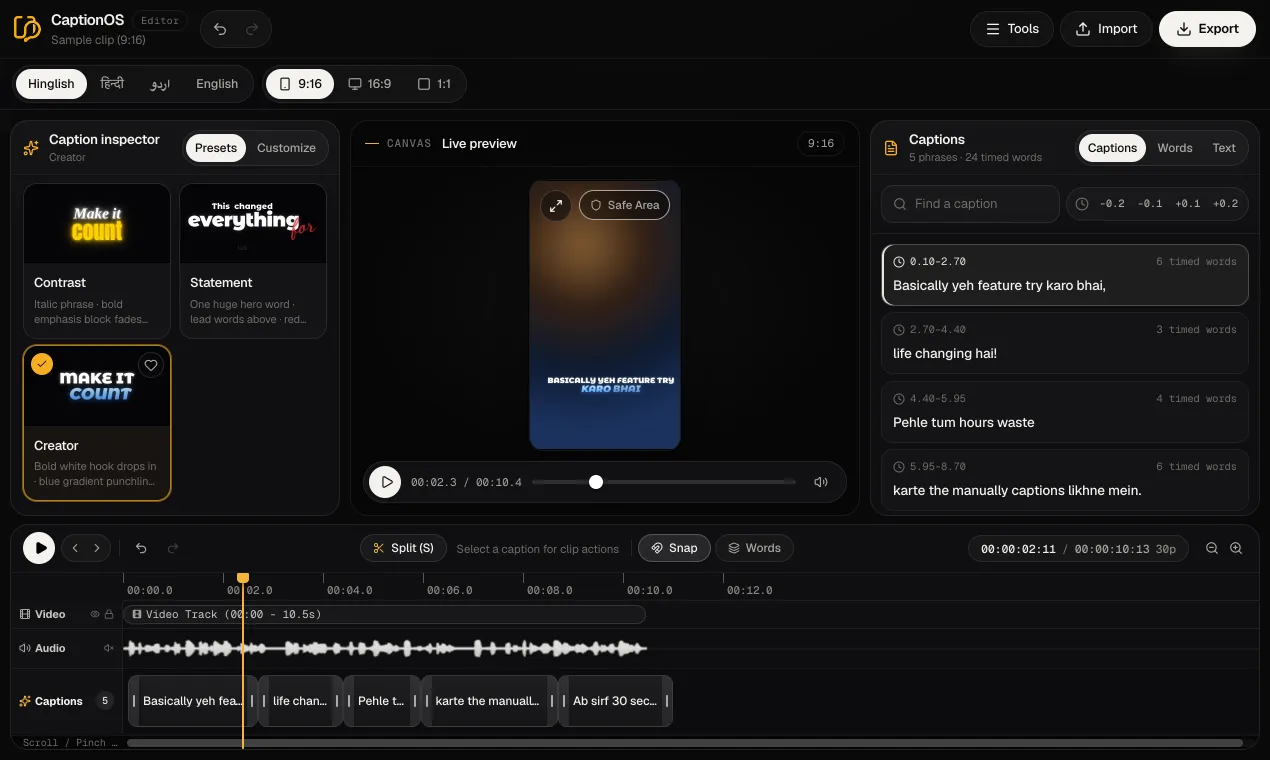
CaptionOS is an online Hinglish caption generator: it listens to your video, writes every spoken word in Roman script, the way Hinglish is typed in chats and comments, and gives each word its own start and end time. Pick one of 17 animated caption styles, fix any word, and export an MP4 with the captions burned in. It runs in the browser on a phone or a computer, and there is a free plan to start.
What it does
- Writes Hinglish in Roman letters. Hindi words come out the way people type them (“yeh”, “karo”, “hai”) and English words read as English (“feature”, “life changing”), as in the sample above.
- Times every word. Each word gets its own start and end time, so the caption styles light up or move each word as it is spoken.
- Animates it in a style you choose. 17 designed styles and 13 typefaces; change the colours, outline, glow, placement, words per phrase and motion. See all the styles.
- Lets you correct anything. Edit any word in the transcript, and move or trim caption blocks on the timeline.
- Exports for any app. An MP4 with the captions burned in (up to 1080p, or 4K on Creator and Pro), SRT and VTT subtitle files on paid plans, and plain text or timestamped JSON on every plan.
How to make Hinglish captions
- Sign up free; no card needed.
- Start a New project and add your video: MP4, MOV or WebM, vertical, square or widescreen.
- Hinglish is already selected. CaptionOS transcribes the speech and times every word.
- Choose a style, read through the words and fix any that are wrong.
- Export the MP4 (or a subtitle file) and post it to Instagram, YouTube, WhatsApp or anywhere else.
For a walk-through aimed at Instagram, with tips on placement and phrase length, see how to add Hinglish captions to Reels.
Check the spelling before you export
Hinglish has no standard spelling: the same word can be “hai”, “h” or “he”, “kya” or “kia”. If the transcript spells a word differently from how you and your audience write it, change it in the transcript. Names, brand words and slang are the ones most worth checking.
Speech recognition makes mistakes too, especially with loud background music, very fast speech or several people talking at once, so read the captions through once before you export.
Hinglish, Hindi or Urdu?
Choose Hinglish when you speak a mix of Hindi and English and your viewers read the way they chat. If they read Devanagari, choose हिन्दी instead; for Urdu script, laid out right to left, choose اردو. Every style has typefaces for all three scripts. Switching transcribes the video again, so it uses transcription minutes from your plan. More in Hinglish or Hindi captions: which to use.
What it costs
The Free plan includes 2 minutes of transcription a month and exports up to 2 minutes long with a small watermark. Paid plans start at ₹49 a week (Weekly), remove the watermark and add SRT and VTT files. See pricing.
Questions
Is this Hinglish caption generator free?
Yes, to start. The Free plan includes 2 minutes of transcription a month and exports up to 2 minutes long, with a small watermark. Paid plans start at ₹49 a week and remove the watermark.
Does it write Hinglish in Roman letters or in Devanagari?
In Roman letters, when the language is set to Hinglish. For Devanagari, choose हिन्दी and the video is transcribed again in Hindi script.
Can it caption speech that mixes Hindi and English?
Yes. That mix is what Hinglish is: the transcript is written entirely in Roman letters, so Hindi and English words sit side by side the way people type them.
Can I download Hinglish subtitles as an SRT file?
Yes, on paid plans (from ₹49 a week), along with VTT. On the Free plan you can download the transcript as plain text or timestamped JSON.
Do I need to install an app?
No. CaptionOS runs in the browser on Android, iPhone, iPad, Windows and Mac.
Try it on your own video
Free plan, no card. Upload a video, pick a language and a style, and see your captions in a minute or two.
Start freeGuides
- How to add Hinglish captions to Instagram ReelsAuto-caption a Reel in Hinglish (Hindi in Roman script), word by word, then style the captions and export an MP4 ready to post. Works on a phone.
- Hinglish or Hindi captions: which script should your videos use?Roman-script Hinglish or Devanagari Hindi for your captions? How to choose for Reels and Shorts, with examples, and how to switch between them.
- Animated word-by-word captions: what they are and how to make themThe bold, word-highlighting captions on Reels and Shorts: what makes them work, how to make them from your own video, and how to style them.
- How to get an SRT subtitle file for a Hindi or Hinglish videoMake an SRT (or VTT) subtitle file from a Hindi, Hinglish, Urdu or English video, check the words and timing, and use it on YouTube or in your video editor.